

Set up a register
A register is a till point at a location, such as the front counter or the bar. Each has its own layout, float, settings and paired devices.
Who can do this: You need to be an owner, admin or manager to do this.
Make a register
Section titled “Make a register”- In the dashboard, choose Registers.
- Choose New register.
- Enter its Name, and choose its Location and Layout.
- Choose Make the register.
Change its settings
Section titled “Change its settings”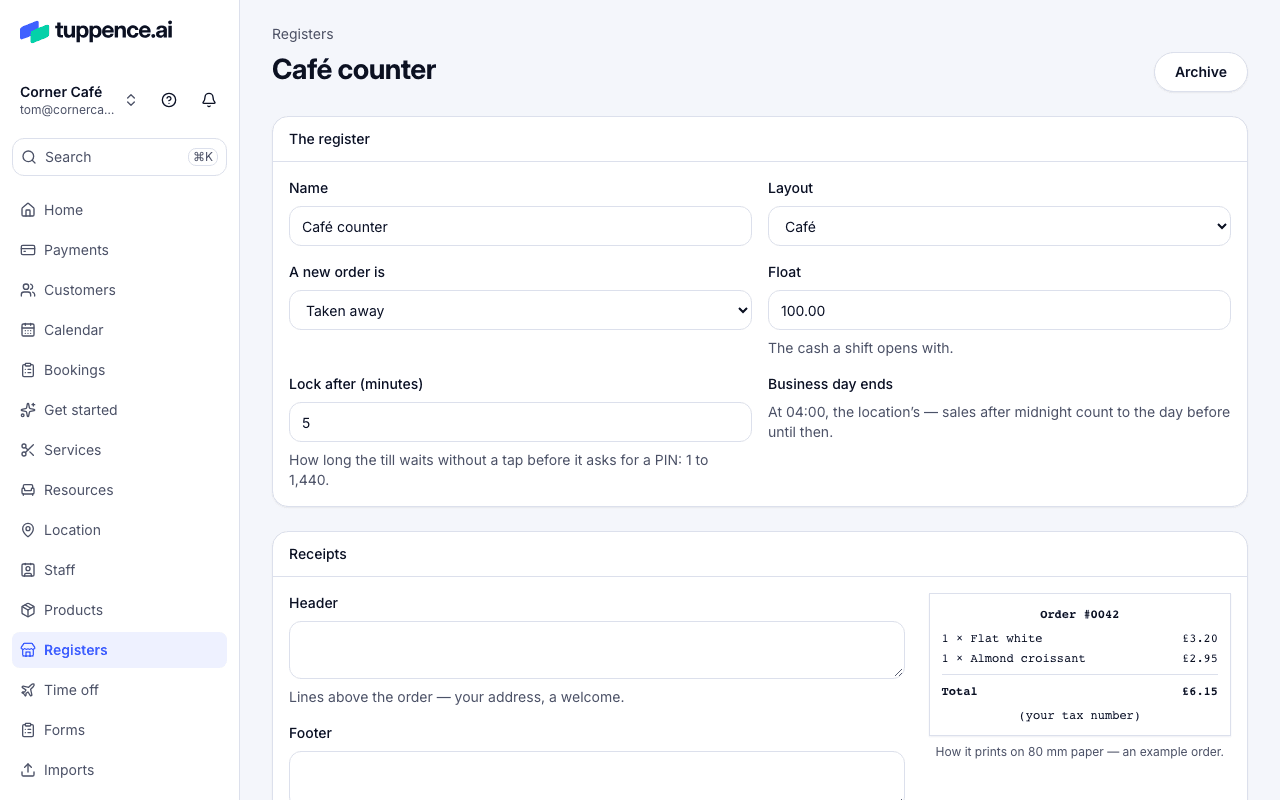
Choose the register, or Edit beside it. Under The register:
- A new order is: the order type a sale starts with, such as Eaten in or Taken away.
- Float: the cash a shift opens with.
- Lock after (minutes): how long the till waits without a tap before it asks for a PIN again.
- Business day ends: until this time, sales after midnight count towards the day before. Useful if you’re open late.
Then:
- Tipping: see Ask for tips at the till.
- Receipts: the Header and Footer lines, Print the tax number, what to offer once an order is paid, and the Paper width. The Receipt preview shows how it will look.
Choose Save the register.
Archive a register
Section titled “Archive a register”Choose Archive on the register’s page. It can’t be used again, and every device paired to it stops at once.