

Create a payment link
A payment link takes a card payment on our secure page. Send it in a message, put it on your website, or print its QR code.
Who can do this: You need to be an owner, admin, manager or developer to do this.
-
Choose Payment links in the sidebar, then Create link.
-
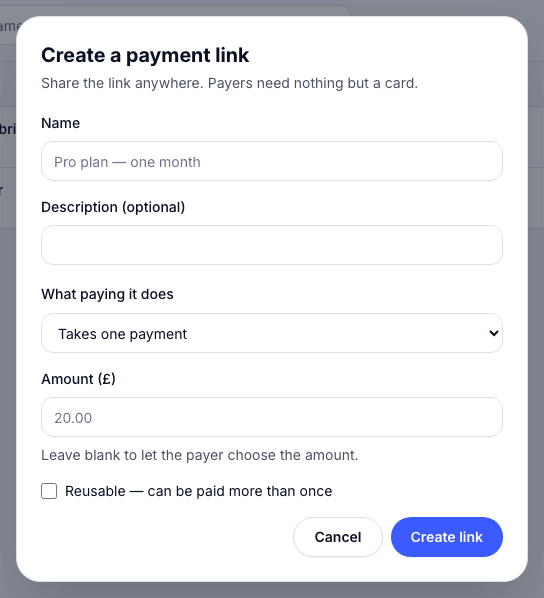
Enter a Name, which your customer sees when they pay. Optionally, add a Description.
-
Under What paying it does, choose Takes one payment, or Starts a subscription and pick the Plan.
-
Enter the amount, or leave it blank to let the payer choose.
-
Tick Reusable (can be paid more than once) for a link many people can pay, like a menu or a donation page. Leave it unticked for a single payment.
-
Choose Create link.
To share it, choose Copy link on the link’s row. For a QR code, choose QR code, then Download PNG or Download SVG. The QR code opens the pay page.
- Tap Links.
- Under New payment link, enter what it’s for and the amount, or leave the amount empty to let the customer choose.
- To make it reusable, turn on Can be paid more than once.
- Tap Make link.
Open the link and tap Share… to send it, or Show QR code for your customer to scan.
Pausing and archiving
Section titled “Pausing and archiving”Archive a link you no longer need. A customer who opens a paid, expired or archived link is told it can’t be paid any more.