

Archive or unpause a payment link
Who can do this: You need to be an owner, admin, manager or developer to do this.
Find a link
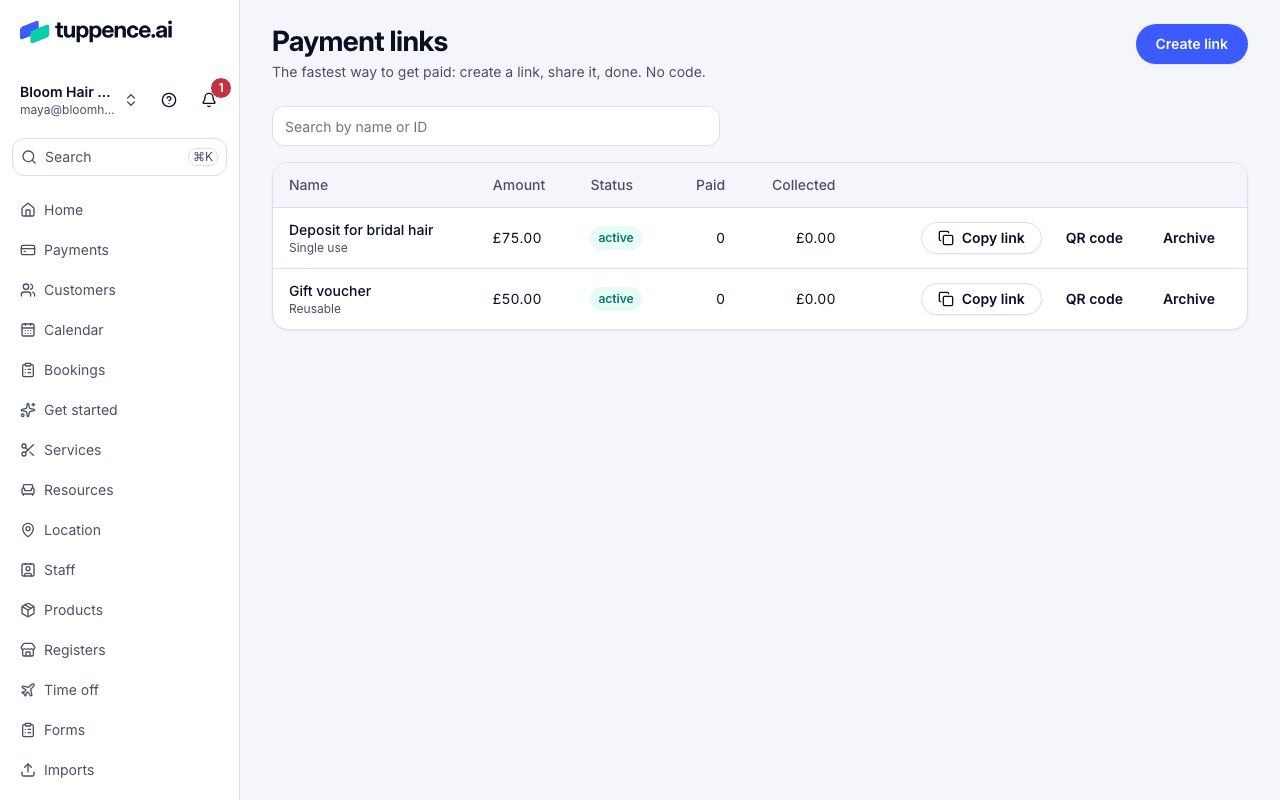
Section titled “Find a link”Choose Payment links in the sidebar. Each row shows the link’s Name, whether it’s Reusable or Single use, the Amount, its Status, how many times it’s been Paid and how much it has Collected. To find one, use Search by name or ID.
Archive a link
Section titled “Archive a link”- Choose Payment links in the sidebar.
- On the link’s row, choose Archive.
Its status changes to archived at once. Anyone who opens it sees This link is no longer available and is told to ask you for a new one. Payments already made aren’t affected.
Archiving can’t be undone. If you need the link again, create a new one.
Change a link
Section titled “Change a link”You can’t edit a link once it’s made. Its amount, name and description stay fixed, so a customer always pays what they were sent. To change one, create a new link and archive the old one.
Unpause a link
Section titled “Unpause a link”If several declined cards are tried on a link in a short time, Tuppence pauses it to protect you from someone testing stolen cards. Its status says paused, with the reason underneath. Customers are told to try again later.
- Read the reason, and check the link’s recent payments under Payments.
- If you’re happy it’s safe, choose Unpause on the link’s row.